




Ahmet Ö.
Corporate
- Thread Author
- #1
## Basic Programming Training with Rockwell Micro800 PLCs and FactoryTalk Design Workbench
We will learn how to set up a simple digital input/output (I/O) project and configure connections using the Ethernet version of Rockwell's Micro800 PLC series and its latest software, FactoryTalk Design Workbench.
Learning a new PLC system can be a big step for control system engineers. The more controllers you've used before, the easier it is to learn a new platform. However, getting guidance at the beginning is always beneficial.
### Project and Hardware Introduction
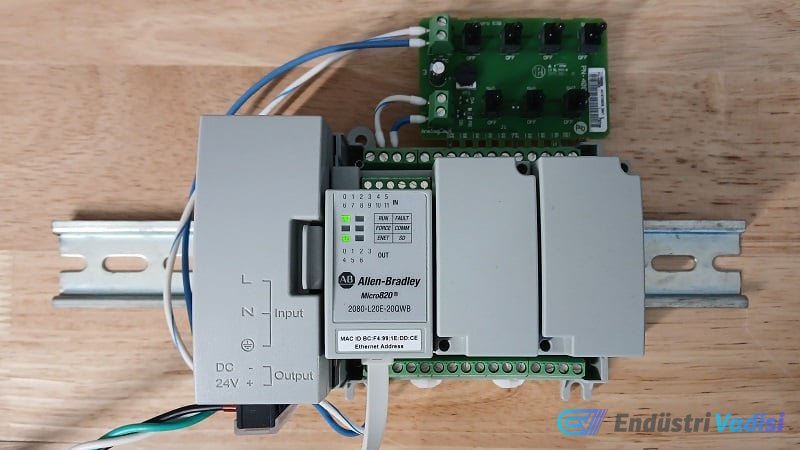
In this training, we will be working on the Micro820 PLC model 2080-L20E-20QWB. To break down the model number: the PLC has 20 built-in I/O terminals, "E" indicates the Ethernet version, and "QW" indicates digital DC inputs and relay outputs. Some I/O terminals can also be used for analog signals, meaning it's a quite capable yet simple PLC.
FactoryTalk Design Workbench is the latest version of Connected Components Workbench software and is a free alternative to RSLogix/Studio 5000. However, it is only suitable for specific models like the Ethernet models of the Micro800 series.
The PLC requires a 24 V DC power supply to operate. With a standard industrial power supply, +24 and -24 volts should be connected to the two leftmost terminals at the bottom of the PLC.
### Connection and Programming Ports
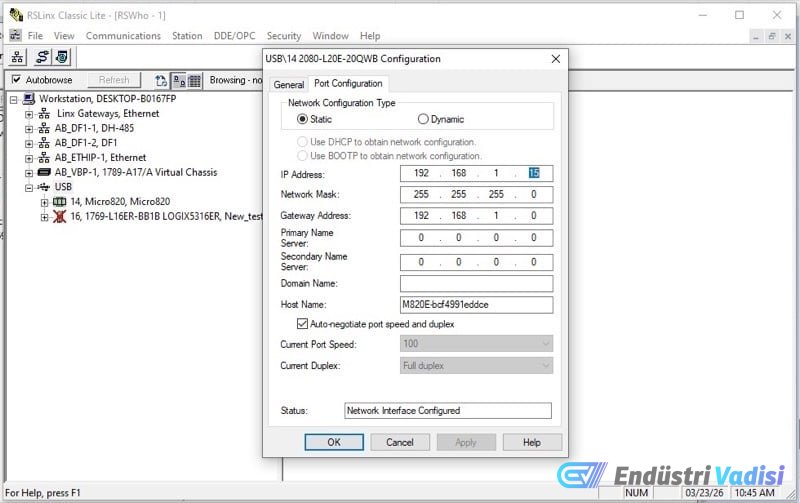
The PLC has two programming ports: USB and Ethernet. USB provides an easy connection without requiring configuration, but in real-world applications, an Ethernet connection is more common. First, the IP address is set via USB, then the connection continues via Ethernet.
The USB-C port connects to the computer with a data cable. Phone charging cables do not support data transfer, so they will not work here.
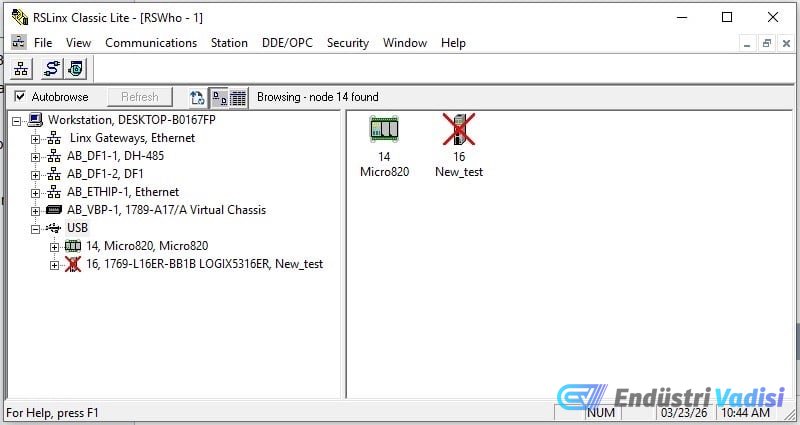
By opening the RSLinx Classic program, we can see the PLC USB driver in the RSWho section. If desired, the USB driver can be added with "Add a Driver".
The PLC is observed to obtain a dynamic IP via DHCP by default. However, it is possible to set the IP address as a static IP, on the same subnet as the computer network but with a different last number.
### Creating a Project and Downloading the Program in FactoryTalk Design Workbench
A new project is started by opening FactoryTalk Design Workbench. Instead of manually adding the PLC, the "Discover" feature can be used to find the live device via its IP address.
In the new project, a ladder diagram type program is created in offline mode. As an example, a very simple program is made where a digital output is energized when a digital input is active.
Command elements from the Toolbox are dragged and dropped into the program. _IO_EM_DI_04 is used for input, and _IO_EM_DO_00 for output.
The project is downloaded to the PLC in online mode and put into "Remote Run" mode to test the program. If the settings are correct, the PLC activates the output connected to the input.
### Technical Specifications
- PLC Model: Micro820 2080-L20E-20QWB
- Number of I/O Terminals: 20
- Connection Type: Ethernet and USB
- Input/Output Types: Digital DC inputs, relay outputs, some analog inputs
- Power Supply: 24 V DC
- Software: FactoryTalk Design Workbench (latest version of Connected Components Workbench)
In subsequent articles, we will examine the use of variable lists, creating alias tags, and the analog input terminals of Micro800 PLCs.
---
All images used with the author's permission.
The topic of how PLC values and data are processed with IEC 61131 numerical types will also be covered in future articles.