
Erkan Teskancan
Kurumsal
- Thread Author
- #1
Over the last ten years, many different programming packages have been released that take a low-code or no-code approach to application creation. The goal is to create an easier user experience without sacrificing the flexibility that custom programming brings.
Low-Code vs. No-Code
These interfaces typically use drag-and-drop style programming with graphical representations of pre-built functions or operations. Users can create simple and complex programs in minutes instead of days or even months.
The collaborative robot industry has embraced this style of programming to create simple and intuitive interfaces that allow end-users to quickly program robots without prior programming knowledge. Ladder logic, the most popular programming language for PLCs, can be listed as a form of low-code programming with its graphical interface and function blocks used in place of operators and functions.
Node-RED, a graphical, low-code IDE, has recently gained popularity in the IIoT sector due to its ease of use and the versatility of the deployment hardware, and the software is finding its way onto many IPC platforms, which is useful for sharing data between local and cloud applications.

Node-RED Interface
Node-RED, built on Node.js and JavaScript, is a function block diagram IDE that can be deployed almost anywhere Node.js is installed.
The purpose of Node-RED is to process and transfer data (numbers, strings, and Booleans) between devices based on events. The IDE mostly creates backend applications that can control I/O, communicate with devices over industrial protocols like OPC UA and TCP/IP, and connect to databases. Thanks to its native web-based core, Node-RED can also use popular web protocols like HTTP, MQTT, and Websockets.
Node-RED offers a library of user interface controls that can be used within the application to allow for user interaction for the frontend environment. When the Node-RED dashboard is installed, you get a full-stack environment with the ability to create edge server applications that can interact with factory equipment and IT infrastructure.
Living on the Edge
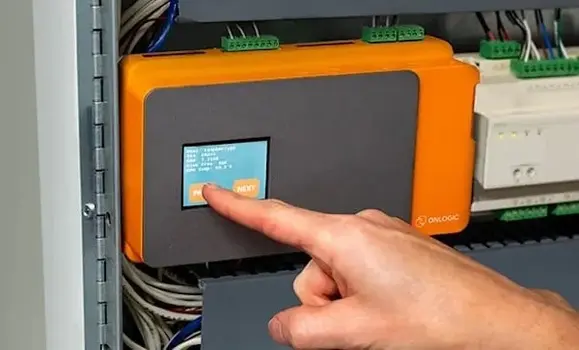
The IIoT and Industry 4.0 movement is mostly concerned with devices communicating with IT equipment. This typically requires an edge device that runs applications and can communicate with OT devices and IT devices. An edge server is typically located in the control panel and is connected to both the machine network and the plant network. The server can then collect data from the machine and then forward the necessary data to IT servers for further analysis. Node.js has the ability to communicate with these devices, but to develop an application, you need to have a certain level of programming experience or use Node-RED.
Using Microcomputers as Edge Servers
The Raspberry Pi is a single-board microcomputer. It runs a Linux-based version and has become quite popular among DIY and hobby electronics enthusiasts. The Pi has become so popular that industrial versions are even available with DIN mount capabilities and industrial enclosures, such as the Factor series IPC from OnLogic.
Node-RED is easily installed on the Raspberry Pi since it is JavaScript-based. Once installed and the Raspberry Pi library is configured, the Node-RED interface can read and write the inputs and outputs of the board on the 40-pin GPIO. In almost seconds, you can have an application running on a credit card-sized computer that can read inputs, set outputs, and have a user interface.
Node-RED Interface
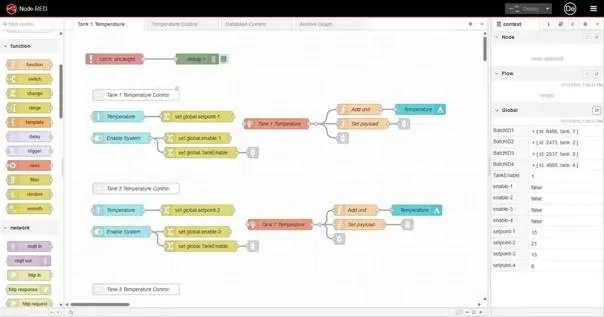
The interface is accessed by entering the IP address of the device. Node-RED loads in a web browser. The palette is located on the left side of the screen and contains all the nodes your project can access. Additional nodes can be installed through the palette manager, similar to NPM packages. The right side contains node properties, debug windows, and dashboard configurations. Each program consists of flows made up of nodes that perform different operations on the payload, such as change, switch, delay, and function. The payload can be a string, an array, or a JSON object and flows from left to right between the nodes. The source of the payload can be from the dashboard, hardware I/O, or communication nodes.
Multiple flows can be added, and payloads can be passed to different flows, or you can store payloads in context stores. All these features allow the user to create well-organized flows that are easy to read and understand.
If there isn't a node that does what you want, you can use the function node, which allows you to write JavaScript code that can take inputs, modify the payload, and produce different results. If you don't want to program it yourself, the palette manager has over 5,000 different nodes created by the Node-RED community that can be made available to you without paying any licensing fees.
Node-RED Applications
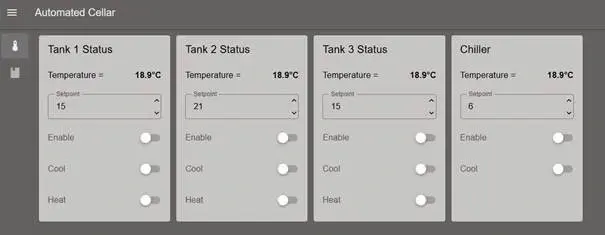
Thanks to its intuitive interface, supported communication protocols, and community forum, the different application possibilities are almost limitless. Node-RED documentation supports IIoT applications such as HMIs, edge servers, and data acquisition systems. With devices like Opto 22's Groov RIO PLC or Bosch Rexroth's ctrlX Core IPC natively supporting Node-RED, you can build a fully automated machine using Node-RED for both your control logic and your HMI.
The next time you are thinking about creating an automation project, take a look at Node-RED and the many different devices it can be installed on.
Low-Code vs. No-Code
These interfaces typically use drag-and-drop style programming with graphical representations of pre-built functions or operations. Users can create simple and complex programs in minutes instead of days or even months.
The collaborative robot industry has embraced this style of programming to create simple and intuitive interfaces that allow end-users to quickly program robots without prior programming knowledge. Ladder logic, the most popular programming language for PLCs, can be listed as a form of low-code programming with its graphical interface and function blocks used in place of operators and functions.
Node-RED, a graphical, low-code IDE, has recently gained popularity in the IIoT sector due to its ease of use and the versatility of the deployment hardware, and the software is finding its way onto many IPC platforms, which is useful for sharing data between local and cloud applications.
Node-RED Interface
Node-RED, built on Node.js and JavaScript, is a function block diagram IDE that can be deployed almost anywhere Node.js is installed.
The purpose of Node-RED is to process and transfer data (numbers, strings, and Booleans) between devices based on events. The IDE mostly creates backend applications that can control I/O, communicate with devices over industrial protocols like OPC UA and TCP/IP, and connect to databases. Thanks to its native web-based core, Node-RED can also use popular web protocols like HTTP, MQTT, and Websockets.
Node-RED offers a library of user interface controls that can be used within the application to allow for user interaction for the frontend environment. When the Node-RED dashboard is installed, you get a full-stack environment with the ability to create edge server applications that can interact with factory equipment and IT infrastructure.
Living on the Edge
The IIoT and Industry 4.0 movement is mostly concerned with devices communicating with IT equipment. This typically requires an edge device that runs applications and can communicate with OT devices and IT devices. An edge server is typically located in the control panel and is connected to both the machine network and the plant network. The server can then collect data from the machine and then forward the necessary data to IT servers for further analysis. Node.js has the ability to communicate with these devices, but to develop an application, you need to have a certain level of programming experience or use Node-RED.
Using Microcomputers as Edge Servers
The Raspberry Pi is a single-board microcomputer. It runs a Linux-based version and has become quite popular among DIY and hobby electronics enthusiasts. The Pi has become so popular that industrial versions are even available with DIN mount capabilities and industrial enclosures, such as the Factor series IPC from OnLogic.
Node-RED is easily installed on the Raspberry Pi since it is JavaScript-based. Once installed and the Raspberry Pi library is configured, the Node-RED interface can read and write the inputs and outputs of the board on the 40-pin GPIO. In almost seconds, you can have an application running on a credit card-sized computer that can read inputs, set outputs, and have a user interface.
Node-RED Interface
The interface is accessed by entering the IP address of the device. Node-RED loads in a web browser. The palette is located on the left side of the screen and contains all the nodes your project can access. Additional nodes can be installed through the palette manager, similar to NPM packages. The right side contains node properties, debug windows, and dashboard configurations. Each program consists of flows made up of nodes that perform different operations on the payload, such as change, switch, delay, and function. The payload can be a string, an array, or a JSON object and flows from left to right between the nodes. The source of the payload can be from the dashboard, hardware I/O, or communication nodes.
Multiple flows can be added, and payloads can be passed to different flows, or you can store payloads in context stores. All these features allow the user to create well-organized flows that are easy to read and understand.
If there isn't a node that does what you want, you can use the function node, which allows you to write JavaScript code that can take inputs, modify the payload, and produce different results. If you don't want to program it yourself, the palette manager has over 5,000 different nodes created by the Node-RED community that can be made available to you without paying any licensing fees.
Node-RED Applications
Thanks to its intuitive interface, supported communication protocols, and community forum, the different application possibilities are almost limitless. Node-RED documentation supports IIoT applications such as HMIs, edge servers, and data acquisition systems. With devices like Opto 22's Groov RIO PLC or Bosch Rexroth's ctrlX Core IPC natively supporting Node-RED, you can build a fully automated machine using Node-RED for both your control logic and your HMI.
The next time you are thinking about creating an automation project, take a look at Node-RED and the many different devices it can be installed on.